


Cashback & ATM near me Cashtic
3.5177.00 Reviews
App Specs
- Version
- 9.0.75
- Updated On
- License
- Free
- Downloads
- 100,000+
- Developer
- Cashtic LLC
- Categories
- Finance
- Platform
- Android
Screenshots
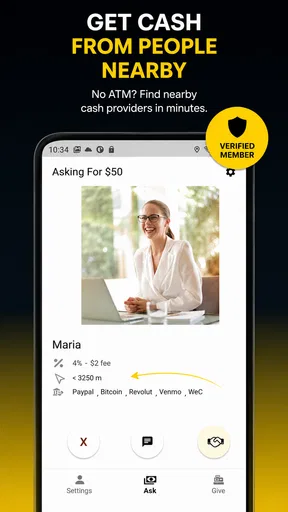
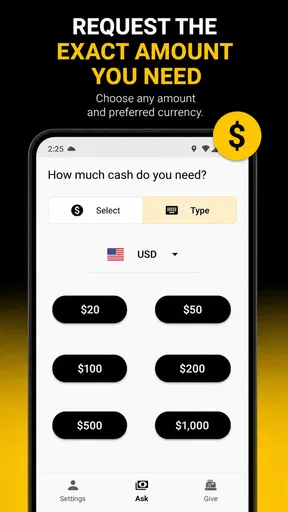
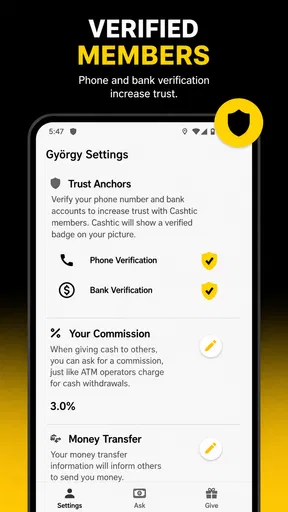
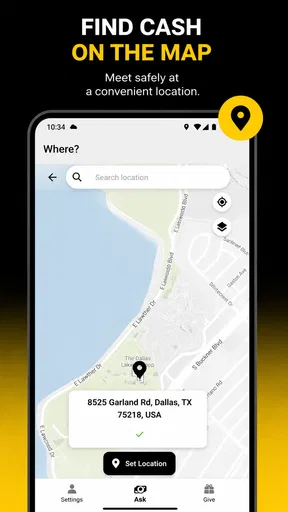
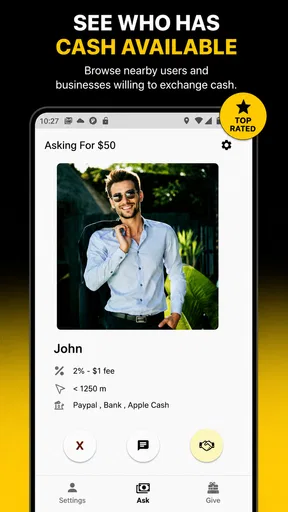
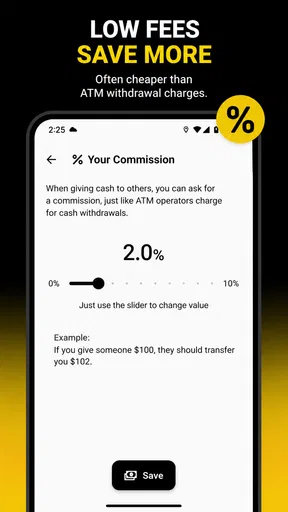
 Analysis by AppCompare
I tried Cashback & ATM near me Cashtic as a practical finance app rather than treating it like a general banking replacement. Its purpose is straightforward: help me look for cashback stores, ATMs, and nearby peer-to-peer cash options. That makes it most interesting when I am already out, need to find a convenient cash-related service, or want to check whether a nearby purchase might fit the app’s cashback focus.
What I like immediately is the narrow idea behind it. Instead of opening a bank app, a map app, and a separate rewards service and trying to combine the results myself, I can start with one finance-oriented tool. The developer is Cashtic LLC, and the app is free to install, with optional in-app purchases listed from $0.99 to $9.99 per item. That distinction matters: I can explore the basic experience without paying upfront, but I should not assume every possible convenience or enhancement is included at no cost.
How Cashtic fits into everyday money decisions
I use Cashtic as a starting point for practical, location-based money choices, not as a replacement for my bank or map app. This section looks at when that focused role is genuinely handy and how I can make a nearby result part of a sensible decision.
A focused way to search while I am away from home
The app’s central value is location-based discovery. When I am in an unfamiliar part of town, the question is often not “What is the best financial service in general?” but “Where can I get cash, use a cashback option, or connect with someone nearby?” Cashtic is aimed at that moment. Its store summary points to cashback stores, ATMs, and peer-to-peer cash near me, so I see it as a discovery layer rather than a full account-management product.
A realistic example is a weekend trip. I might arrive somewhere without having planned where to withdraw money, then notice that a small business prefers cash. I can use Cashtic to investigate nearby possibilities before walking several blocks or relying on the first ATM I see. If cashback is part of my shopping plan, I can also check the app before choosing where to spend. That workflow is more useful than casually browsing the app at home because the location context gives the search a real purpose.
There is also a useful separation between finding an ATM and finding a cashback opportunity. Those needs can look similar when I am in a hurry, but they are not the same decision. An ATM solves access to cash, while a cashback store may affect where I shop or how I pay. Keeping both ideas in one finance app can reduce the mental switching involved in a quick errand.
What the free entry point means
Cashtic costs nothing to download, which makes it easy to test against the apps I already use. I do not need to commit money before learning whether its nearby results are useful in my area. The listed optional purchases change the value question, however. A free starting point is attractive for occasional searches, while frequent users should pay attention to which parts of the experience require an item purchase and whether those additions actually save time or money.
Worth Reading Before You Choose

EA SPORTS FC Mobile 26 Is a Bigger Football Game, but It Takes Time

Flipboard Shows What News Apps Must Do Beyond the Feed

Switching to Android Auto Means Rethinking Your Driving Routine

Google Calendar Makes a Crowded Week Easier to Manage

Ludo King Makes the Most of the Minutes Between Plans

Baby Panda World Brings Quick Play to Modern Phones, but Its Game Library Feels Busy
I would judge any purchase by a simple rule: it should either help me find a worthwhile cashback opportunity or make a cash search noticeably more convenient. Paying merely to see a familiar map result would be harder to justify because ordinary map and banking tools already cover some location tasks. The app is therefore strongest when its finance-specific discovery gives me something more relevant than a general map, not simply another way to display a pin.
The age rating is Everyone, so the presentation is intended for a broad audience. That does not remove the need for sensible financial habits. I would still verify the business, ATM, or person involved before making a transaction, especially when the app points me toward a peer-to-peer cash option. A location tool can guide a decision, but it should not replace checking the details of that decision.
How it compares with familiar alternatives
A bank app is usually better for viewing balances, managing cards, reviewing transactions, and locating the bank’s own supported ATMs. A map app is usually better for broad place discovery, directions, opening hours, and user-submitted location information. Cashback services may offer deeper reward tracking or redemption details. Cashtic sits between these categories: it is more finance-focused than a general map, but it is not presented as a complete bank account or a universal rewards wallet.
That middle position is both its appeal and its limitation. If I only need my bank’s nearest ATM, the bank app may be faster and more reassuring. If I want turn-by-turn directions or extensive local reviews, a map app may remain the better tool. Cashtic earns its place when I want to search across the specific ideas of nearby cashback, ATMs, and peer-to-peer cash in one place.
I would not install it expecting it to replace every financial app on my phone. Instead, I would treat it as a companion for location-based money choices. That expectation makes the product easier to evaluate fairly: its success depends on how useful its nearby discoveries are, not on whether it offers the account features of a bank.
Practical habits that improve the experience
My first tip is to search before I am standing at the checkout. A few minutes of planning lets me compare a cashback possibility with the store I was already going to use. If I wait until payment is happening, I may choose the first convenient option and lose the chance to make a better-informed decision.
My second tip is to use the app as a shortlist, not as final proof. For an ATM, I would confirm the location and check the machine itself for any displayed fee before withdrawing. For a cashback store, I would look at the terms shown at the time of purchase and keep the receipt when the reward matters. For peer-to-peer cash, I would be especially careful about identity and meeting arrangements. These steps are not glamorous, but they prevent a location result from being mistaken for a guarantee.
A third useful approach is to compare convenience with total cost. The nearest ATM may not be the cheapest one, and a cashback opportunity may not compensate for buying something I did not need. I would calculate the practical benefit rather than chasing every nearby option. The app can help me notice possibilities, but I still have to decide whether the trip, fee, or purchase makes sense.
Finally, I would test it in the places where I actually spend time. A finance discovery app can feel excellent in one city and less useful in another because the local options determine its everyday value. Since Cashtic has passed 100K installs and carries an average rating of 3.5 from roughly 843 ratings, I see evidence of meaningful interest but also a reason to keep expectations measured. The rating suggests I should try it personally instead of assuming the experience will be equally strong everywhere.
Where the friction appears
The first possible friction is overlap with tools I already have. Most phones can open a map, and many banks provide an ATM finder. If those tools already answer my usual questions, Cashtic may feel like an extra step. Its advantage depends on whether the combined focus on cashback and peer-to-peer cash produces more relevant choices than those alternatives.
The second issue is the difference between discovery and completion. Finding a nearby option is useful, but I may still need another app, a card, a bank account, or a direct conversation to complete the actual transaction. That is not necessarily a flaw, because Cashtic’s role is narrower, but it affects how much time it saves. I would be disappointed only if I expected a complete payment workflow.
The third trade-off involves optional spending. Because purchases can range from $0.99 to $9.99 per item, I would avoid buying anything until I understand what it changes for me. Occasional users may find the free access sufficient. More frequent users might see value in an added convenience, but only after comparing that cost with the value of the cashback or time saved. The price range is concrete; the personal return depends on how often I use the app and what opportunities it actually surfaces.
There is also a trust consideration with any app that brings financial activity and nearby people into the same conversation. I would not share sensitive banking information simply because a result appears in a finance category. I would use normal caution with personal details, verify destinations independently, and avoid treating a peer-to-peer listing as automatically safe. The app can make discovery easier without making every discovered option equally suitable.
Who is most likely to get value
Cashtic makes the most sense for someone who regularly moves between neighborhoods, travels, shops in unfamiliar areas, or wants one place to start when looking for cash-related options. It may also suit a person who actively checks for cashback possibilities before choosing a store. The free installation lowers the risk of trying it, particularly when the user has a specific nearby search in mind.
I can also see value for people who dislike jumping between a bank app and a map app. The app’s appeal is not that it performs every financial task, but that it organizes a particular kind of local search around money. That focused workflow can be worthwhile for someone who often asks where to withdraw cash or where a cashback option might be available.
It is less convincing for someone who rarely uses cash, always shops through a single established rewards program, or only needs the ATM locator built into a bank app. It is also not my first choice for detailed budgeting, account management, bill payment, or transaction history. Those jobs call for a dedicated banking or budgeting product with a different purpose.
Users who are very price-sensitive should begin with the free experience and resist assuming that every paid item will pay for itself. The right question is not whether a small purchase sounds inexpensive, but whether it produces a measurable benefit in the user’s normal routine. If I only search once every few months, paying for extra convenience is difficult to defend. If I use the discovery tools repeatedly and they lead to useful choices, the calculation may be different.
Device support and the current app profile
The app runs on Android 7.0 or later, which gives it a broad compatibility range for Android users with older supported devices. Its current version is 9.0.75, so I would install the latest available release rather than judge the experience from an outdated copy. I would also keep the app updated when possible, especially for a location-oriented finance tool where reliability matters during a real errand.
Cashtic was released on October 15, 2020, and its continued presence alongside the current version suggests that it has remained an active product rather than a one-time experiment. Still, the age of the original release is not a guarantee that every local result will be current. I would confirm important details at the moment I need them, particularly when an ATM, store, or person’s availability affects my plans.
The app’s free price makes that testing process reasonable. I can see whether the interface suits me, whether nearby searches are relevant, and whether the app adds anything beyond my existing tools before considering optional purchases. That is the right order: test usefulness first, then decide whether paid value exists for my specific habits.
My buy-or-skip verdict
My recommendation is to try Cashtic if I want a dedicated way to explore nearby cashback stores, ATMs, and peer-to-peer cash options. The free entry point makes experimentation easy, and the focused combination is more distinctive than a basic ATM finder. I would use it as a practical starting point before an errand, a trip, or a purchase in an unfamiliar area.
I would skip paid items unless I had already identified a clear benefit. The optional purchase range is not automatically unreasonable, but value depends on frequency, location, and whether the added function improves a real decision. A general map is better for directions, a bank app is better for account-linked services, and a rewards app may be better for users committed to one cashback program.
Overall, I see Cashback & ATM near me Cashtic as a useful specialist rather than an all-purpose finance solution. Its best quality is convenience at the discovery stage: it brings several nearby cash-related possibilities into one focused experience. Its main weakness is that the final value still depends on the accuracy and usefulness of local results, plus the choices I make after finding them. For me, that makes it worth trying for free, while keeping paid extras optional and carefully justified.
Pros
- Find nearby ATMs quickly using your current location.
- Cashback offers can help reduce costs on everyday purchases.
- Simple interface makes searching and browsing offers easy.
- Useful for travelers who need local cash withdrawal options.
- Location-based results can save time when you are in unfamiliar areas.
Cons
- ATM availability and cashback details may vary by location.
- Some offers may include eligibility rules or minimum spending limits.
- Location access is needed for accurate nearby ATM results.
- Displayed ATM information may occasionally be outdated.
- Cashback rewards may take time to appear or be credited.
FAQs for Cashback & ATM near me Cashtic
What is Cashback & ATM near me Cashtic?
Cashback & ATM near me Cashtic is designed to help users locate nearby places where they may withdraw cash or request cashback, depending on the services supported in their area. After installing the app, you can use its location-based search to view nearby ATMs and participating retailers. Availability, displayed information, and supported features may vary by country, provider, and local business.
How does Cashtic find ATMs and cashback locations near me?
Cashtic generally uses your device’s location to search for nearby ATMs and cashback points. You may need to grant location permission for the app to provide accurate results, although some versions may also allow manual searches by entering a city, address, or postcode. Results can depend on map data and business listings, so it is sensible to confirm opening hours, fees, and availability before traveling.
Does Cashback & ATM near me Cashtic charge fees?
Downloading or using Cashtic may be free, but the app itself does not necessarily determine the fees charged for withdrawing cash or receiving cashback. ATM operators, banks, card issuers, and participating retailers can apply their own charges, limits, or eligibility rules. Always review the transaction screen and check the provider’s terms before confirming a withdrawal or cashback request.
Can I withdraw cash directly through Cashtic?
Cashtic should be understood primarily as a tool for finding nearby cash access points rather than a replacement for your bank or payment card. Whether you can complete a withdrawal through a particular location depends on the ATM, retailer, card network, and any supported services. You will normally need an eligible bank card or payment method, and the app may redirect you to the selected provider.
Is Cashback & ATM near me Cashtic safe to use?
Cashtic can be useful for discovering nearby cash access options, but users should still apply normal security precautions. Download it from an official store, review its requested permissions, and avoid sharing banking passwords, PINs, or sensitive card details unless you are using a trusted financial service. Before visiting a location, verify the address and inspect the ATM for tampering, especially in unfamiliar areas.


